How to Securely Onboard, Adopt and Monitor Third-Party GitHub Actions at Scale
An opinionated guide for platform teams and developers.
The views in this guide are my own and aren’t official Microsoft guidance. Contoso and Fabrikam are fictional. GitHub settings and limits change often, so check the linked docs before you rely on them. Prefer a summary? See the 30-minute slides (PDF).
Table of contents
- Part 1 — Principles and Best Practices
- TL;DR
- What this covers (and what it doesn’t)
- The principles
- Make the secure path the fastest path
- Only run what you’ve approved, at exact SHAs
- Pin everything to a full commit SHA
- Review the code that actually runs
- Keep tokens and secrets on a short leash
- Lock down the runner
- Know what you run, and who owns it
- Keep watching
- Let every approval expire
- Be ready for the day an action goes bad
- Upstream, mirror or wrapper?
- Settings checklist
- Part 2 — How Contoso Secured Its Third-Party Actions
- Prologue: The incident (Why This Matters)
- Chapter 1: The post-mortem (Lessons and Decisions)
- Chapter 2: The cast and the map (Roles, Responsibilities and the End-to-End Process)
- Chapter 3: Cleaning house (Step 0 · Bootstrap)
- Chapter 4: The first request (Step 1 · Requesting a Third-Party Action)
- Chapter 5: Two doors (Step 2 · Onboarding New Third-Party Actions)
- Chapter 6: Going live (Step 3 · Adopting Approved Actions)
- Chapter 7: Watching the fleet (Step 4 · Monitoring Usage)
- Chapter 8: Versions come and go (Step 5 · Lifecycle Management)
- Chapter 9: A compromised action (Step 6 · Compromised Action Response)
- Chapter 10: Breaking the glass (Step 7 · Break-Glass Exceptions)
- Epilogue: One year later (Outcomes and Lessons Learned)
- Extras
- Appendix: Beyond third-party actions
- Further reading
Every uses: line in a workflow runs someone else’s code next to your source code, your token and your secrets. Most teams add them without a second thought. This guide gives them that second thought, without slowing anyone down.
- Part 1 covers the principles and the settings. It works for any organization.
- Part 2 is a story: how Contoso, a fictional company, put those principles to work after a bad day. It’s fiction, built from real facts at different organizations.
Part 1 — Principles and Best Practices
TL;DR
- Make the secure path the fastest path. Self-service requests, a catalog and published turnaround times for onboarding / updating third-party actions.
- Only run what you’ve approved, at exact SHAs. Trusted publishers are the one deliberate exception.
- Pin everything to a full commit SHA. Tags move. Commits don’t.
- Review the code that actually runs, not the README.
- Keep tokens and secrets on a short leash. Read-only by default, and no secrets near third-party code.
- Lock down the runner, with the team that runs it. Ephemeral, default-deny egress, and every new destination approved like a secret.
- Know what you run, and who owns it. A catalog, an inventory and a sponsor team for every action.
- Keep watching, trusted publishers included.
- Let every approval expire. Old SHAs leave. Exceptions too.
- Be ready for the day an action goes bad. Block in minutes, rotate everything, rehearse.
Who owns what: the platform team runs the process and the tooling. The dev team that asked for an action sponsors it, and shares the job of keeping it safe and up to date. The security team watches what runs, and joins on risky requests and incidents. The Infra team runs the runners and owns their egress rules. None of them can do it alone.
What this covers (and what it doesn’t)
This guide is about third-party actions: any uses: owner/repo@ref that lives outside your enterprise. That includes GitHub’s own actions/*, Microsoft and Azure actions, everything on the Marketplace, and whatever those actions pull in when they run: nested actions, container images and downloaded tools.
It doesn’t cover:
- Building and sharing internal actions, like CODEOWNERS on
.github/workflows/**or linting workflows with required checks in repository rulesets. - General workflow hardening, like restricting
pull_request_targetandworkflow_run, or blocking script injection from${{ github.event.* }}. - How to build your runner platform. This guide only says what runners need to do.
- Packages your own
run:steps install. That’s regular dependency management.
For a short checklist of these surrounding controls, see Appendix: Beyond third-party actions.
The principles
Make the secure path the fastest path
If getting an action approved takes weeks, people copy its code into their repository or pick something worse. Either way, you lose sight of what runs. Security that slows everyone down gets routed around.
- Give developers a self-service way to search the catalog and request what’s missing.
- Publish turnaround times, and meet them.
- Automate every check that doesn’t need a human.
- Make every policy failure link to the catalog and the request form.
Build it on what developers already use: GitHub issue forms in a platform repository, repository custom properties for catalog data, an internal developer portal like Backstage, or your ITSM tool.
Only run what you’ve approved, at exact SHAs
An allowlist turns “anyone can add anything” into a decision with an owner. Allowing an exact SHA means the code you reviewed is the code that runs.
- Set the Actions policy to Allow enterprise, and select non-enterprise, actions and reusable workflows, enforced at enterprise level.
- Turn off Allow Marketplace actions by verified creators. A verified badge tells you who published an action, not that it’s safe.
- Generate the allowlist from the catalog with automation, and alert on manual edits.
The allowlist entries you’ll actually use:
| Entry | What it’s for |
|---|---|
owner/repo@<full-sha> | One approved SHA from an untrusted publisher |
owner/repo@* | Every SHA of one repository from a trusted publisher |
!owner/repo@* | Blocking a compromised action, whatever else allows it |
!owner/repo@<full-sha> | Blocking one bad SHA from a trusted repository |
Avoid owner/*: it trusts every repository that owner has today or creates tomorrow.
Trusted publishers are a trade-off. GitHub, Microsoft and Azure ship so many actions that approving every SHA isn’t realistic. Allowing owner/repo@* for their repositories saves time and allowlist entries, but it also lets in future SHAs nobody reviewed. Accept that only for a short list of organizations, and balance it with SHA pinning, daily monitoring and a fast block. The Allow actions created by GitHub checkbox does the same for every repository in actions and github, archived ones included. Per-repository entries give you more control.
Mind the 1,000-entry limit. It’s a hard limit, so keep the list clean: at most two live SHAs per untrusted action, one action per capability, and nothing nobody uses. Alert well before you reach it.
Pin everything to a full commit SHA
Tags and branches move. Whoever controls the upstream repository decides what @v4 means tomorrow. In the tj-actions/changed-files compromise, the attacker moved existing tags to a malicious commit, and every workflow using a tag ran it.
- Turn on Require actions to be pinned to a full-length commit SHA at enterprise level. It applies to every remote action, internal ones too, so migrate first.
- Write references as
uses: owner/repo@<40-char-sha> # v2.4.1. The SHA is what counts. The comment is for humans. - Migrate existing workflows with pinact, Renovate or a script.
- Keep pins fresh with Dependabot version updates, which bump both the SHA and the comment. Treat each bump as a request for review, not an approval.
A pin stops a reference from moving. It doesn’t make the code safe.
Review the code that actually runs
The runner executes much more than the README suggests: action.yml, the compiled dist/ bundle, pre and post hooks, nested actions, container images and anything downloaded at run time. In the March 2026 Trivy compromise, some teams that had pinned aquasecurity/trivy-action to an older SHA were still exposed, because that commit loaded a nested action by tag.
- Copy the exact SHA into an isolated environment developers can’t use, and review it there.
- Scan it with GitHub Advanced Security (CodeQL, Dependabot, secret scanning), the GitHub Advisory Database, OpenSSF Scorecard and zizmor. Add an AI review if you like, as advice only.
- Don’t rush new code. Wait until the repository is at least 2 months old and the SHA at least 7 days old, so the community has time to spot a bad release. Security fixes skip the wait, never the review.
- Work through the onboarding checklist.
Where to do the review:
| Option | Isolation | Trade-off |
|---|---|---|
| A separate GHE instance | Strongest | One more GHE instance to run. |
| A locked-down organization | Medium | Shares the enterprise’s policies and admins. If “Allow Enterprise Actions” is enabled, it may bypass isolation. |
| A throwaway sandbox per review | Medium | Nothing keeps scanning afterwards, so lifecycle management and continuous security assessment is not being performed by your team. |
Keep tokens and secrets on a short leash
An action can read every secret and environment variable in its job, and scrape the runner’s memory for more. That’s exactly what the tj-actions payload did. It doesn’t matter which step a secret was meant for.
- Under Organization › Settings › Actions › General › Workflow permissions, choose Read repository contents and packages permissions.
- Turn off Allow GitHub Actions to create and approve pull requests, unless explicitly approved.
- Start workflows with
permissions: {}and grant permissions per job. - Set
persist-credentials: falseonactions/checkoutin jobs that run third-party actions. - Never use
secrets: inheritwith a third-party reusable workflow, and nevertoJSON(secrets).
Ways to keep secrets away from third-party actions. They work best combined:
| Option | How it works | Trade-off |
|---|---|---|
| Split the job | Run the third-party action in a job without secrets, and hand its results to a privileged job as artifacts | Workflows need restructuring |
| Environment secrets | Secrets exist only in jobs that target a protected environment | Environment setup and approvals |
| OIDC | Short-lived cloud credentials instead of stored secrets | Cloud IAM setup |
| Required check | Fail a pull request when a job running a “no secrets” action can reach a secret. zizmor’s secrets-inherit and overprovisioned-secrets audits are a good start | You build the catalog-aware part |
| Audit log | The workflows.prepared_workflow_job event lists the secrets each job received. Compare it with the catalog | Detects, doesn’t prevent |
Lock down the runner
A compromised action sends data anywhere the runner can reach. A runner that gets reused hands one job’s leftovers to the next.
- Use ephemeral runners by default: one job, then gone. GitHub-hosted runners already work this way. For self-hosted, use just-in-time or autoscaled ephemeral runners.
- Give self-hosted runners default-deny egress: allow GitHub, your registries and the destinations each action needs. Log what gets blocked.
- Standard GitHub-hosted runners have no egress control. Keep sensitive secrets and data out of jobs that run third-party actions there.
- Limit self-hosted runner groups to selected organizations and repositories.
When a job needs both third-party code and sensitive data, move it to an egress-controlled self-hosted runner, use GitHub-hosted runners with private networking, or accept the risk in writing.
When an action needs a new destination, like a deployment to a third-party vendor, the Infra team that runs the runners is part of the decision:
- Treat a network destination like a secret. Declare it in the request, approve it, and record it in the catalog’s
network:field. The catalog is the source of truth: the Infra team, or automation, turns it into egress rules, ideally through a pull request to an egress-as-code repository. - Scope rules to a runner group, not the shared pool. For example, a
deploy-northwindgroup that only the repositories deploying to that vendor can use. - Allow exact hostnames. No wildcards on shared hosting like
*.amazonaws.comor*.blob.core.windows.net: attackers can host there too. - Find out what the action actually calls. During onboarding, run it on a test runner that logs traffic without blocking it, and compare that with what the request declared.
- Split the job. The third-party action runs with no secrets and no extra network. A separate deploy job uses the vendor’s CLI, with OIDC where the vendor supports it, and can reach only the vendor.
Know what you run, and who owns it
In an incident, the first question is always “where do we use this?” Without an inventory, the answer takes days.
- A catalog, with one entry per action: approved SHAs, the access each one gets, a sponsor team and dates. See the catalog entry example.
- What workflows declare, refreshed daily: every
uses:in workflows and composite actions, the SHA each one resolves to, and the nested actions those actions call. Scan your repositories with a custom script or using 3rd party tools like poutine. - What actually ran, at which SHA and with which secrets. The job logs list every action the runner downloaded, nested ones included, with its SHA. The
workflows.prepared_workflow_jobaudit log event lists the secrets.
The dependency graph SBOM can’t do either job alone. It only reads .github/workflows/ on the default branch, leaves tags unresolved and skips nested actions. It never shows what ran.
Keep the catalog as YAML in a protected repository, in repository custom properties, or in a developer portal.
Keep watching
Approval is a moment, but risk keeps moving: new advisories, moved tags, compromised maintainers. And here’s the catch: Dependabot doesn’t raise alerts for actions pinned to a SHA. Pinning switches that safety net off, so you need your own.
- Every day, match the GitHub Advisory Database against every live action, trusted publishers included.
- Every day, check the Dependabot alerts on your reviewed copies, to catch vulnerable dependencies inside the actions.
- All the time, stream the audit log to your SIEM, with detections for manual policy changes, secrets reaching “no secrets” actions, and CI tokens behaving strangely.
GHESentinelAutomation has detection examples for Microsoft Sentinel.
Let every approval expire
Without expiry dates, the allowlist only grows. Old and vulnerable SHAs stay usable for years, and you hit the 1,000-entry limit.
Defaults that work:
| When | The old SHA expires |
|---|---|
| A newer version is approved | 3 months later |
| A High vulnerability is found | 30 days later |
| A Critical vulnerability is found | The same day |
| The action is compromised | Blocked right away |
| A break-glass exception is granted | 72 hours by default, 7 days at most |
- Warn teams before the date, and open the migration pull requests for them.
- Remove the SHA on its date. Need more time? That’s what break-glass is for.
Warn through code scanning alerts, issues or chat. Open pull requests with Dependabot, Renovate or your own bot.
Be ready for the day an action goes bad
The damage happens in the first hours. Blocking takes one allowlist entry. Knowing which runs and secrets were exposed takes data you have to be collecting already.
- Block with
!owner/repo@*. It wins over every allow entry. - Keep audit logs at least as long as your incident look-back window.
- Write down who confirms, communicates, contains, scopes, rotates and closes.
- Revoke old credentials as soon as the new ones work.
- Rehearse: a tabletop exercise twice a year, a technical drill every quarter.
Upstream, mirror or wrapper?
Once an action is approved, where do workflows pull it from? You can choose per action.
| Model | Workflows use | Good | Hard | Pick it for |
|---|---|---|---|---|
| Vetted upstream | owner/action@<approved-sha> | Simplest. Exact-SHA allowlisting | You still depend on the upstream being there | Most actions |
| Internal mirror | enterprise/action-mirror@<approved-sha> | Availability and control | You become the distributor. Exposing only approved SHAs is hard. Nested actions need mirroring too | Critical actions with a fragile upstream |
| Internal wrapper or replacement | An internal action or reusable workflow | Full ownership | Highest effort to build and maintain | Strategic or heavily used capabilities |
Settings checklist
Policy
- Actions policy: Allow enterprise, and select non-enterprise, actions and reusable workflows, enforced
- Allow Marketplace actions by verified creators: off
- Allowlist generated from the catalog, with alerts on manual edits
- Require actions to be pinned to a full-length commit SHA: on
Permissions
- Workflow permissions: read repository contents and packages
- Allow GitHub Actions to create and approve pull requests: off
- A required policy check on every pull request, through an organization ruleset
GitHub Advanced Security
- CodeQL (including the
actionslanguage), secret scanning with push protection, and Dependabot, wherever third-party code is reviewed or used
Runners
- Ephemeral runners by default
- Default-deny egress on self-hosted runners
- Self-hosted runner groups limited to selected organizations and repositories
- No sensitive secrets in third-party jobs on standard GitHub-hosted runners
- Every network destination in the catalog has an egress rule, scoped to a runner group
- Blocked-egress alerts go to the platform, security and Infra teams
Monitoring
- Audit log streamed to your SIEM, with detection rules, kept for your incident look-back window
- Daily checks: advisories, Dependabot on reviewed copies, moved tags
- A catalog with a sponsor and an expiry date for every SHA
Part 2 — How Contoso Secured Its Third-Party Actions
This is a fictional story based on real facts from different organizations. Contoso, Fabrikam, the people and the numbers are made up. The incidents and the practices aren’t: they come from public incidents such as the
tj-actions/changed-filescompromise, the GhostAction campaign and the Shai-Hulud worm, and from what real platform teams do.
Each chapter is a short scene, followed by the steps: who does it, when, what, and how you know it’s done.
The process at a glance. Prefer to skip the story? Every step has its own chapter, and the numbers match the diagram.
| Step | What happens | Led by | Chapter |
|---|---|---|---|
| 0 · Bootstrap | Inventory what’s in use, seed the catalog, pin to SHAs, enforce | Platform team | 3 |
| 1 · Request | A team asks for an action or a new version | Dev team (sponsor) | 4 |
| 2 · Onboarding | 2a fast track for trusted publishers, 2b full review for everyone else | Platform team, with the sponsor | 5 |
| 3 · Adoption | Teams use the approved SHA within its limits | Dev teams | 6 |
| 4 · Monitoring usage | What’s used, where, and what actually ran | Platform team | 7 |
| 5 · Lifecycle management | 5a version updates, 5b vulnerability management, 5c deprecation and removal | Platform team and dev teams | 8 |
| 6 · Compromise response | Block, scope, rotate, recover | Platform team, with the security team | 9 |
| 7 · Break-glass | A temporary exception when delivery is blocked | Platform and security teams | 10 |
Prologue: The incident (Why This Matters)
Contoso, early 2025 (fictional):
- 1,000+ developers in 100+ teams, all on GitHub Enterprise (GHE), with 2,100 private repositories.
- A platform team that runs GHE as a self-service product, with automation for the setup. Developers are its customers, and it balances security with speed of delivery.
- Not a fully regulated industry, but security and governance are priorities.
- Azure for infrastructure and services, with Entra ID for identities.
- GitHub Advanced Security, with CodeQL, secret scanning and Dependabot.
- Four teams touch CI/CD: platform, security, Infra and the dev teams. Each one owns its part. Nothing connects them.
March 2025. Sam (Security), on call in Contoso’s security team, spots the build bot cloning private repositories from IP addresses nobody knows. The trail leads to
tj-actions/changed-files, used by tag in 24 Contoso repositories, three of them public. For about a day, those tags pointed at a commit that dumped the runner’s secrets into the logs.
What really happened (public record):
- An attacker moved the action’s version tags to a malicious commit. Investigators linked it to an earlier compromise of
reviewdog/action-setup. - Every workflow using a tag ran the payload on its next run. More than 23,000 repositories used the action.
- The payload read the runner’s memory and printed secrets, double base64-encoded, into the workflow logs. In public repositories, anyone could read them.
What it cost Contoso (fictional): the action leaked secrets for about a day. The attacker used them for three weeks.
- All of its source code. The release job of one public repository held the build bot’s token: a classic personal access token with the
repoandworkflowscopes, on every repository in the organization. Within hours, the attacker had cloned all 2,100 private repositories: every product, every internal tool, every Terraform module. - Every secret in that code. Ten years of Git history held secrets nobody had cleaned up: database connection strings, storage account keys, a payment provider’s API key. Secret scanning had flagged most of them years before. The alerts were still open.
- The secrets of other repositories. With the
workflowscope, the attacker pushed a one-file workflow to a new branch in 40 repositories. It ran on push, sent the repository’s secrets to the attacker, and deleted the branch. Only secrets behind an environment with required reviewers stayed out of reach. - Azure and Entra ID. One of those secrets was
AZURE_CREDENTIALS, the client secret of the production deployment service principal. It was Owner on the production subscriptions, and it hadApplication.ReadWrite.Allin Entra ID so the pipeline could create app registrations. The attacker copied database backups with customer data out of a storage account, then added new client secrets to three other app registrations. Rotating the original secret didn’t lock them out. - Commits in Contoso’s name. The bot could bypass branch protection, so releases didn’t wait for a review. The attacker used it to push one commit to a shared internal npm package: a
postinstallscript that sent environment variables to the attacker. The normal pipeline published it, and 70 services built with it over 9 days. Every build from those days was rebuilt and redeployed. - The bill. Customer data meant notifying the data protection authority within 72 hours, and writing to 40 enterprise customers. Releases froze for three weeks. Nobody knew which job held which secret, so more than 250 credentials were rotated, just in case. An outside incident response firm stayed for six weeks.
Why it took so long (fictional): four teams each held part of the answer, and none of them knew it. Every hour they spent finding each other was an hour the attacker kept.
- Seeing it. The audit log wasn’t streamed anywhere, and nothing watched it. Sam (Security) noticed the clones a day late, almost by chance. When he asked which repositories the bot had cloned, its Git events were about to expire: the audit log keeps them for only seven days.
- Stopping it. Security had flagged unpinned actions in a quarterly report that nobody outside security read. The platform team had SHA pinning on its backlog, waiting for a business case. Nobody owned the Actions policy, so Sam spent the first three hours finding out who could change it, and blocking the action took a day.
- Scoping it. Dev teams had stopped asking and built their own fixes. With no inventory, finding every workflow that used the action took four days. With no map of which job held which secret, every team rotated everything it could find, and missed the secrets the attacker had taken from other repositories.
- Cutting off the cloud. The Infra team owned the service principals, but nobody told them until day 3, because the incident was “a GitHub problem”. The new app registration secrets turned up in week 3, in a manual review of the Entra ID audit logs.
- Trusting the code again. The bot’s commits had no review and looked like every other release. Finding the bad one meant reading every bot commit since the leak, across 2,100 repositories. That’s how the npm package stayed live for 9 days.
Chapter 1: The post-mortem (Lessons and Decisions)
The post-mortem reaches the CTO on a Thursday. Its first finding isn’t technical: platform, security and dev teams each saw part of the problem, and nobody saw all of it. On Friday, Marta (Platform), who leads the GitHub Enterprise platform team, gets her brief: “Make every third-party action we run safe, without slowing teams down. And do it with Sam and the dev teams, not for them.”
Marta (Platform) and Sam (Security) go through the post-mortem one row at a time. Each failure gets a decision, and each decision follows a principle from Part 1.
| What went wrong | What was missing | What Contoso decided | Principle |
|---|---|---|---|
| A moved tag delivered malicious code | An allowlist and SHA pinning | Only allowlisted actions run, pinned to a full SHA. Existing workflows get migrated with pinact. | Only run what you’ve approved, Pin everything |
| Nobody had ever looked at the action | A review before approval | GitHub, Microsoft and Azure are trusted publishers, allowed per repository. Everyone else gets in one reviewed SHA at a time, tested in the Review GHE: a separate GHE Cloud instance, isolated from the one where teams work, that keeps a copy of every approved SHA. | Review the code |
| The job held secrets it didn’t need | Least privilege, and no secrets near third-party code | Tokens are read-only by default, and actions can’t create or approve pull requests. | Short leash |
| One token could write to every repository, one secret could reach Azure | Short-lived, scoped tokens and OIDC | Bots use GitHub Apps with short-lived tokens instead of personal access tokens. Azure deployments use OIDC instead of client secrets. | Short leash |
| Nothing limited where the payload could send data | Egress-controlled runners | Runners are ephemeral. Self-hosted runners get egress rules. Sensitive data goes to GitHub-hosted runners only when there’s no other way. | Lock down the runner |
| Four days to find every usage | An inventory with owners | Every action gets a catalog entry and a sponsor team, and the inventory refreshes daily. | Know what you run |
| The first alert came a day late | Continuous monitoring | The audit log streams to Microsoft Sentinel, with automated detections (GHESentinelAutomation). | Keep watching |
| Teams added any action they liked | A fast, approved route | The platform team runs a self-service process with published turnaround times. Once an action is in, its lifecycle is shared with the sponsor team. | Secure path, fastest path |
| Four teams each held part of the answer | One process with owners | One process, end to end. Security and dev teams have a named role in every step, and everyone shares one channel for third-party actions. | The cast |
| A day to block, weeks to rotate | A rehearsed response plan | A written runbook that blocks an action in minutes, rehearsed with drills. | Be ready |
One principle has no row: let every approval expire. The incident didn’t call for it, but an approved SHA doesn’t stay safe forever. Chapter 8 shows why.
Chapter 2: The cast and the map (Roles, Responsibilities and the End-to-End Process)
For the first time, the platform, security, Infra and dev teams are in one room. Sam (Security) brings detections nobody else had seen. Ana (Payments), speaking for the dev teams, brings a list of what teams actually need. Marta (Platform) writes the cast on the whiteboard before drawing a single box. “If a step has no owner, it won’t happen.” Sam adds: “And if the owners don’t talk, it won’t work.”
The cast
| Who | In the story | Looks after |
|---|---|---|
| Platform team | Marta | The machinery: portal, catalog, Review GHE, checks, allowlist, monitoring, containment |
| Sponsor team | Ana, tech lead in Payments | The use case: why it’s needed, reviewing it with the platform team, testing, migrating on time |
| Consuming teams | Everyone else using the action | Using it as approved, migrating before expiry, rotating their secrets |
| Security team | Sam | SIEM detections, incident investigation, co-approving break-glass |
| Infra team | The team that runs Contoso’s self-hosted runners | The runners: images, runner groups, egress rules and network logs |
Who does what
| Step | Platform team | Dev teams | Security team | Infra team |
|---|---|---|---|---|
| 0 · Bootstrap | Inventory, catalog, enforcement | Merge the pinning pull requests | – | Ephemeral runners, and a baseline egress allowlist from the traffic runners already make |
| 1 · Request | Triage | Ask, and explain why | Consulted on risky requests | – |
| 2 · Onboarding | Run the checks, decide, publish | Review and test | Consulted on risky requests | Consulted on new destinations, apply the egress rules on publish |
| 3 · Adoption | Catalog and policy check | Use as approved | – | – |
| 4 · Monitoring usage | Inventory, run evidence, dashboards | Fix flagged workflows | SIEM detections | Blocked-egress logs to the SIEM |
| 5 · Lifecycle management | Review updates, run daily security checks, set expiry dates, open pull requests | Request updates, merge pull requests | Consulted on Critical findings | – |
| 6 · Compromise response | Confirm, contain, scope, track | Rotate their secrets | Investigate | Block the destination, isolate the runner group |
| 7 · Break-glass | Approve and expire | Ask | Co-approve | – |
The numbers
| What | Value |
|---|---|
| Onboarding, trusted publisher | 1–2 business days |
| Onboarding, untrusted publisher | 3–5 business days |
| Egress rule for a new destination | Within the onboarding window |
| Minimum age, repository / SHA | 2 months / 7 days |
| Old SHA after a newer version | Expires in 3 months |
| High / Critical finding | Expires in 30 days / the same day |
| Migration pull requests | 7 days after a feature release, right away for a security fix |
| Review copy after its SHA is gone | Archived after 30 days |
| Break-glass | 72 hours by default, 7 days at most |
| Allowlist warning | 800 of 1,000 entries |
The map
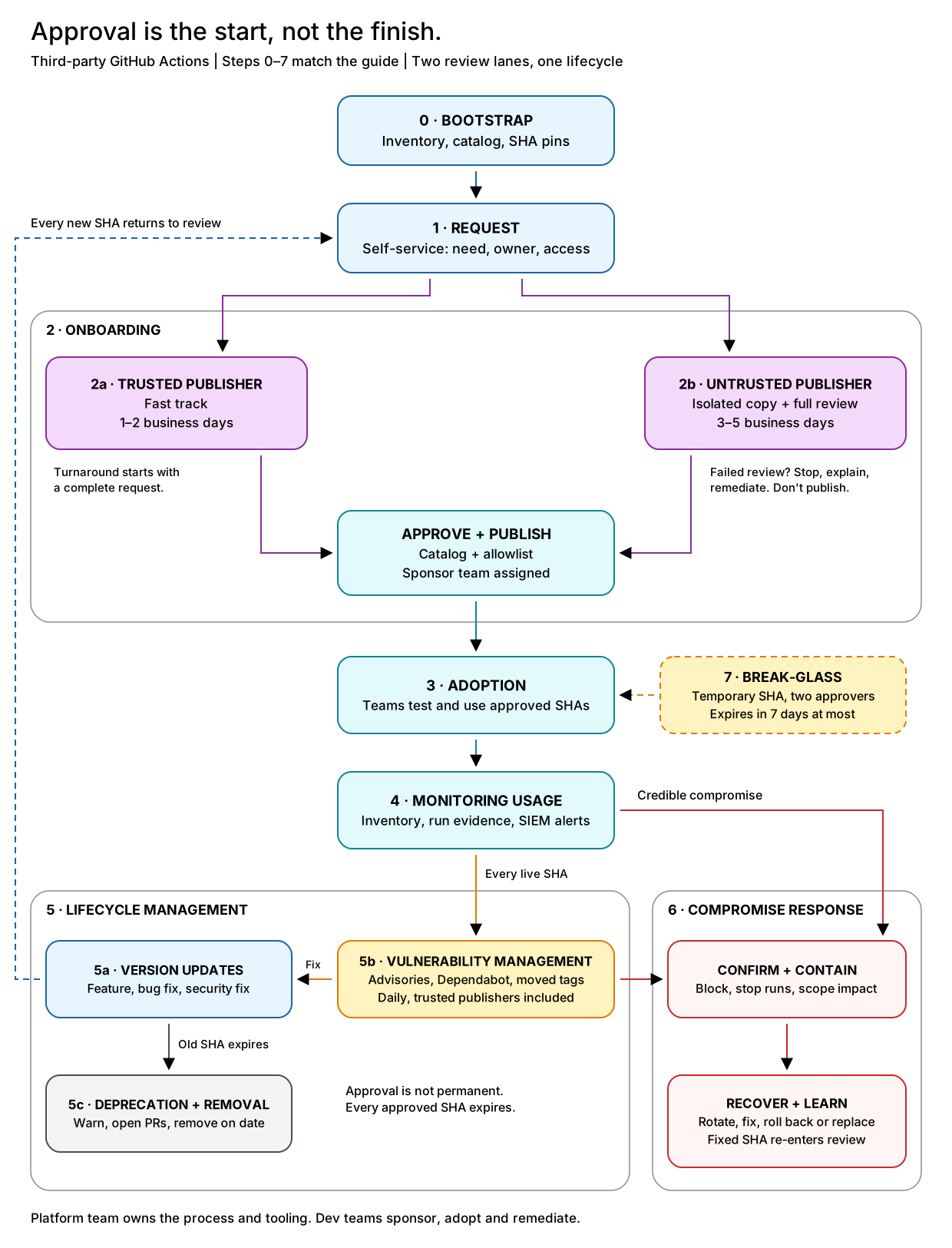
Chapter 3: Cleaning house (Step 0 · Bootstrap)
April 2025. Marta’s (Platform) first inventory finds 1,800
uses:lines pointing at 350 different third-party actions. Two thirds use a tag. Twenty-two of them do the same thing: post to Slack. Twenty-two teams solved the same problem, and none of them asked the others.
Who: the platform team, with dev teams merging the pull requests · When: once, one organization at a time
- Take an inventory, from two sources. What workflows declare: scan every repository’s workflows and composite actions, resolve each tag to its SHA, and follow the nested actions. What actually ran: parse the job logs from the last 90 days, where the runner records each action it downloads with its SHA. Note the action, the ref, the SHA, the workflow and job that use it, and whether the job holds secrets.
- Sort it.
- Trusted publisher: allow the repository.
- Untrusted and in use: run the full review on the SHA in use. If it passes, catalog it with a sponsor. If not, replace it within 30 days. Start with jobs that hold secrets.
- Unused, duplicated or abandoned: leave it behind, and point teams to the alternative.
- Seed the catalog and the allowlist. One SHA per untrusted action where possible. Count the entries before you enforce anything.
- Pin. Automation opens pull requests that rewrite every
uses:line to the catalog SHA with pinact. Internal actions included. - Enforce, one step at a time: the policy check in warning mode for a few weeks, then the allowlist, then the SHA-pinning setting, then the policy check as blocking. Announce each step a month ahead. Break-glass works from day one.
Done when: every workflow uses full SHAs, every action has a catalog entry and a sponsor, enforcement is on, and the inventory refreshes daily.
Chapter 4: The first request (Step 1 · Requesting a Third-Party Action)
September 2025. Ana’s Payments team wants every pull request to show how a Helm chart change alters the Kubernetes manifests. The catalog has nothing, but the Marketplace has
fabrikam-oss/helm-diff-action. She opens a request before lunch.
Who: the team asking, which becomes the sponsor; the platform team triages · When: what you need isn’t in the catalog
- Search the catalog first. If there’s an approved action, or a CLI you can call from a
run:step, use that. - Pick the request type: new action, new version, or break-glass.
- Fill in the form: what you need, why, where it runs, what access it needs, and who sponsors it.
- Tick the developer checklist:
- We use only the approved full SHA.
- Jobs that use it get only the permissions and secrets declared here.
- We don’t feed untrusted input, like pull request titles or branch names, into inputs that reach a shell.
- We test it, migrate before expiry, and rotate our secrets if it’s ever compromised.
- The platform team triages, mostly automatically: is it complete, is it a duplicate, is the publisher trusted? Anything touching secrets, write permissions, OIDC or release paths gets flagged to the security team.
- Follow the status:
triage→in-review→approvedorrejected.
Done when: the request is complete and on the right track within a business day.
Contoso runs requests as issue forms in a platform/actions-catalog repository, and keeps the catalog there as YAML. A developer portal or an ITSM tool works too. Pick whatever your developers already use.
Chapter 5: Two doors (Step 2 · Onboarding New Third-Party Actions)
Same week. The Infra team asks for
azure/loginand gets it the next morning. Ana’s request takes the other door: Fabrikam isn’t trusted, sofabrikam-oss/helm-diff-actionv2.5.0 gets the full review. Four days later, it’s in the catalog.
Trusted publishers: the fast track (2a · Trusted Publisher Onboarding)
Who: the platform team · When: the repository belongs to a trusted publisher
Contoso’s trusted list is short, and made of organizations, never individuals: actions, github, microsoft and azure. To join it, a publisher needs a verified identity, a security policy, enforced 2FA, and protected tags or immutable releases. The list is reviewed twice a year.
- Check the repository really belongs to that organization, and isn’t a look-alike or a fork.
- Check it isn’t archived and has no open advisory for the version.
- Add
owner/repo@*to the allowlist. - Add the catalog entry, and send the team a snippet with the recommended SHA.
Done when: it’s allowlisted and in the catalog within 1–2 business days.
Every future SHA from that repository is now allowed without review. That’s the price of speed. SHA pinning still applies, daily monitoring covers these repositories too, and a single ! entry blocks one bad SHA or the whole repository.
Everyone else: the full review (2b · Untrusted Publisher Onboarding)
Who: the platform team with the sponsor, plus the security team for risky cases · When: any other publisher
- Mirror the approved commit into the Review GHE, one repository per approved SHA, named
{repo}-{sha}(shorten the SHA in the repository name if needed). Preserve the original Git history so the approved commit retains its upstream SHA. Point the default branch at that commit, and enable GitHub Advanced Security. - Run the checks: GitHub Advanced Security, the Advisory Database, Scorecard, zizmor and an AI review, then the onboarding checklist.
- Stop on a blocking finding, and post what failed on the request.
- Decide together. Marta (Platform) and Ana (Sponsor) go through the results: approve, approve with restrictions, or reject. The security team joins when the action needs secrets, write access or OIDC.
- Publish. Merge the catalog entry with Payments as the sponsor. Automation adds
owner/repo@<sha>to the allowlist. - Test it. The sponsor tries it in a non-production workflow first.
Done when: it’s approved and allowlisted, or rejected with reasons, within 3–5 business days.
Why one repository per SHA? Default behavior of Dependabot and CodeQL is to scan the default branch only, so one copy per SHA keeps every approved SHA under watch. Each copy is also a record of exactly what was approved, and a backup if the upstream disappears. Teams then switch their workflows to the copy.
Why not mirror everything? Workflows use the upstream at an exact SHA, which keeps things simple, and the Review GHE copy covers the “upstream vanished” risk. Contoso moves an action to a mirror or an internal wrapper only when it’s critical enough to justify the work.
Chapter 6: Going live (Step 3 · Adopting Approved Actions)
Ana (Sponsor) pastes the snippet into her workflow. The policy check fails: the same job holds
KUBECONFIG_PROD, and the catalog says this action gets no secrets. She moves the diff into its own job, and the check goes green.
Who: every team using the action · When: it’s in the catalog
- Copy the catalog snippet: the SHA, with the version as a comment.
- Use the newest active SHA, never one that’s about to expire.
- Start with
permissions: {}, and give each job only what the catalog allows. - Run the third-party action in its own job, with no secrets, and pass the results on as artifacts.
- Test it in your own workflow.
- Need more access than the catalog allows? Ask for it. Don’t work around it.
Done when: the workflow uses an active SHA, stays within its limits, and passes the policy check.
Third-party code in one job, privileges in another:
on: pull_request
permissions: {}

jobs:
  diff:                                              # third-party code, no secrets
    runs-on: ubuntu-latest
    permissions:
      contents: read
    steps:
      - uses: actions/checkout@<sha>                 # vX.Y.Z
        with:
          persist-credentials: false
      - uses: fabrikam-oss/helm-diff-action@<sha>    # v2.5.0
        with:
          chart: ./charts/payments
          output: diff.md
      - uses: actions/upload-artifact@<sha>          # vX.Y.Z
        with: { name: helm-diff, path: diff.md }

  comment:                                           # privileges, no third-party code
    needs: diff
    runs-on: ubuntu-latest
    permissions:
      pull-requests: write
    steps:
      - uses: actions/download-artifact@<sha>        # vX.Y.Z
        with: { name: helm-diff }
      - run: gh pr comment "$PR" --body-file diff.md
        env:
          GH_TOKEN: ${{ github.token }}
          GH_REPO: ${{ github.repository }}
          PR: ${{ github.event.pull_request.number }}
The policy check runs as a required workflow on every pull request, and reads the catalog from its own protected repository. It fails when:
- a job asks for more permissions than the catalog allows;
- a job with a “no secrets” action can reach a secret through
env,with,secrets: inheritortoJSON(secrets).
Build it with a script that reads the catalog, OPA or Conftest policies, or zizmor with a configuration generated from the catalog.
Chapter 7: Watching the fleet (Step 4 · Monitoring Usage)
October 2025. Sam’s (Security) dashboard flags a job that runs
helm-diff-actionand receivedNPM_TOKEN. The policy check only looked at job-levelenv:, and a workflow-level block handed the token to every job. The team fixes it that afternoon. Marta (Platform) fixes the check the next day. Before the incident, that alert would have stayed in a security queue.
Who: the platform team, with the security team running the detections · When: all the time
Keep two kinds of evidence apart: what workflow files say today, and what actually ran. Today’s files can’t tell you what ran last Tuesday.
| Question | Where the answer comes from |
|---|---|
| Which actions and SHAs do workflows declare, and where? | The daily inventory: lockfiles or the repository scan, nested actions included |
| What actually ran, and when? | The job logs, collected on each workflow_job webhook. The runner logs every action it downloads, nested ones included, with its SHA |
| Which secrets did each job get? | The workflows.prepared_workflow_job audit log event. It doesn’t list actions, so join it with the job logs by run |
| Is anything running that isn’t in the catalog? | What ran compared with the catalog |
| Who’s still on an expiring SHA? | The inventory compared with expiry dates |
| Is the allowlist healthy? | The entry count, and entries nobody used in 90 days |
Detections worth starting with:
- the Actions policy changes outside automation;
- a third-party job gets a secret its catalog entry doesn’t allow;
- a CI token creates repositories, or clones far more than usual;
- a self-hosted runner blocks outbound traffic while a third-party action runs.
Example: a token that clones too much. In Contoso’s December drill, the red team replays the prologue. It takes a copy of the build bot’s token and starts cloning repositories from a laptop outside Contoso’s network.
Detect. The audit log stream includes Git events. Every clone arrives as a git.clone event with the actor, the IP address and a hash of the token (token data on Git events is in public preview). A Microsoft Sentinel rule runs every 5 minutes and flags any token that cloned 20 or more repositories in the last 15 minutes:
let threshold = 20;
let bulkCloners = dynamic(["contoso-backup[bot]"]); // clones everything by design
GitHubAuditLog_CL
| where TimeGenerated > ago(15m)
| where Action == "git.clone" and Actor !in (bulkCloners)
| extend HashedToken = tostring(parse_json(RawEvent).hashed_token)
| summarize Repos = dcount(Repository), Sample = make_set(Repository, 50),
            IPs = make_set(ActorIP), FirstClone = min(TimeGenerated)
    by Actor, AccessType, HashedToken
| where Repos >= threshold
Contain, automatically. The rule raises a High incident. A Sentinel automation rule then runs a playbook, a Logic App that doesn’t wait for anyone:
- Cut the token off. For a GitHub App Contoso owns, like the build bot, suspend its installation (
PUT /app/installations/{installation_id}/suspended), so none of its tokens work. For a person’s fine-grained token, revoke the actor’s tokens for the organization through the API. - Gather the evidence. Add the repositories, IP addresses and token type to the incident, plus the jobs that received the bot’s credentials in the last 24 hours, from
workflows.prepared_workflow_job. That’s where the leak most likely happened. - Call a person. Post to the security channel and page the on-call, with the steps to undo the suspension.
Decide. Sam (Security) takes it from there. A false alarm? Lift the suspension. A leak? Start the compromise response (Step 6, Chapter 9).
Automate only what’s cheap to undo. Suspending a bot for an hour costs some red builds. Letting it clone for an hour costs your source code. Blocking an action stays a human call: the SIEM sees the token, not the action that leaked it.
How it went. The rule fired 6 minutes after the first clone, and the next clone failed a minute later. By then the red team’s script had 64 repositories. Detection limits the damage but doesn’t prevent it, so Marta (Platform) narrowed the bot’s tokens to the repositories each job needs.
Done when: for any action, you can answer every question above in minutes, and a token cloning far more than usual is cut off without waiting for a person.
Keeping secrets away from third-party actions takes layers. Design them out with split jobs, environment secrets and OIDC. Catch mistakes in the pull request with the policy check. Catch the rest in the audit log, like Sam (Security) just did.
Chapter 8: Versions come and go (Step 5 · Lifecycle Management)
November 2025. Fabrikam ships v2.6.0 with OCI chart support, and Ana (Sponsor) asks for it. Three days later it’s approved, and v2.5.0 gets an expiry date in February. A week after that, pull requests land in every repository using it. By February nobody’s left on v2.5.0, and it leaves the allowlist without anyone noticing.
Updates (5a · Version Updates)
Who: the sponsor asks, the platform team reviews · When: a team needs a fix or a feature
- Request the new version in the portal.
- It goes through the full review again: a new copy in the Review GHE, the same checks. If it fails, stop.
- Add the new SHA to the catalog and the allowlist.
- Give the old SHA an expiry date, 3 months out.
- Tell every team using the action that a new version is available, and when the old one goes.
Security findings (5b · Vulnerability Management)
Who: the platform team investigates, teams merge the fixes · When: a daily check flags something High or Critical
Every day, automation checks the Dependabot alerts on every Review GHE copy, the Advisory Database for every live action (trusted publishers included), and the upstream tags. When something High or Critical shows up:
- Investigate. Is it real, and does it affect how you use the action? If it looks like a compromise, go straight to the compromise response (Step 6, Chapter 9).
- Find the fix upstream, and run it through the update process. Security fixes skip the queue and the 7-day wait, but never the review.
- Set the expiry date: the same day for Critical, 30 days for High.
- Retire the old SHA, as below.
No fix by the deadline? Replace the action, or use break-glass.
Retirement (5c · Deprecation and Removal)
Who: platform automation, with teams merging the pull requests · When: a SHA has an expiry date
- Warn early. Contoso raises a GHAS Code Scanning alert in each affected repository through the API, so the warning shows up where developers already look (the Code Scanning tab in each repository).
- Open the pull requests: 7 days after a feature release, so a bad release has time to surface, or right away for a security fix.
- On the date, remove the SHA from the allowlist and mark it expired in the catalog. Workflows still on it fail, with a link to the replacement.
- 30 days later, archive the Review GHE copy.
Done when: nothing references the old SHA, it’s off the allowlist, and its copy is archived.
Chapter 9: A compromised action (Step 6 · Compromised Action Response)
February 2026. At 10:12 on a Monday, Sam’s (Security) SIEM lights up: self-hosted runners keep blocking calls to an unknown domain whenever
helm-diff-actionv2.6.0 runs. At 10:14, Sam opens the incident in the shared channel. Marta (Platform) and Ana (Sponsor) are already there. At 10:30, Fabrikam confirms it: a dependency bundled into v2.6.0 carried a dormant payload that woke up over the weekend. At 10:41, the action is blocked across Contoso.
Who: the platform team leads, teams rotate, the security team investigates · When: a credible signal, from an advisory, a SIEM alert, a moved tag or a community report
- Confirm. Take 30 minutes at most. If in doubt, block: a false alarm only costs some red builds.
- Communicate. Tell the sponsor and every team using the action what’s happening, and that their runs will fail. One channel, one owner.
- Contain. Add
!owner/repo@*to the allowlist, mark the action compromised in the catalog, and cancel running jobs that use it. - Scope. From the audit log and run data, list every run that used the action since the SHA was approved, not just since the first alert. For each run, note the secrets, permissions, OIDC roles and runner it had, and everything it produced.
- Rotate. Teams rotate every exposed secret and revoke the old one right away. The platform team tracks it to zero. Rebuild anything the affected runs produced.
- Fix. If there’s a clean fix upstream, it goes through the full review. If not, roll back to the last good SHA, or replace the action.
- Close. Once every secret is rotated, run the post-mortem and update the checklist and the detections.
- Rehearse. A tabletop exercise twice a year, a technical drill every quarter.
Done when: the action is blocked, every exposed secret is rotated, and the post-mortem is written.
How it went. The self-hosted runners blocked every outbound call. Two repositories ran the diff on GitHub-hosted runners, which have no egress control, but the audit log showed those jobs had no secrets. All they could leak was a read-only token that expired with the job, and some Helm charts. One job had received a SONAR_TOKEN through a reusable workflow the policy check didn’t cover yet. It was rotated within the hour.
| Prologue (2025) | Chapter 9 (2026) | |
|---|---|---|
| The first hour | Finding out who owned the policy | Blocking the action |
| Time to block | A day | 29 minutes |
| Finding affected runs | Four days | One query |
| Credentials rotated | 250+ | 1 |
| What leaked | All private source code, Azure access and customer data | Some Helm charts |
The review didn’t catch this one. A dormant payload looks harmless until it wakes up. What saved Contoso were the controls that don’t depend on the review: no secrets in the job, egress rules, and someone watching.
Chapter 10: Breaking the glass (Step 7 · Break-Glass Exceptions)
The next morning, Payments is stuck. The Helm diff is a required check, and every pull request is red. Ana (Sponsor) asks to roll back to v2.5.0, which is clean but expired. Marta (Platform) and Sam (Security) approve it for 7 days, in Payments repositories only, with no secrets and on egress-controlled runners. Three days later Fabrikam ships a clean v2.6.1. As a security fix it skips the wait but not the review, Payments moves to it, and the exception expires on its own.
Who: the platform and security teams approve, and the team asking owns the risk · When: delivery is blocked and the normal route is too slow
- Ask through the portal, with the SHA, the repositories, why it can’t wait, how you’ll limit the risk, and an end date.
- Get two approvals: one from the platform team, one from the security team, within 4 hours.
- Allow it. Automation adds a temporary allowlist entry with an expiry date, and the policy check limits it to the named repositories. To allow an older SHA of a blocked action, first narrow the block from
@*to the bad SHA. - Limit the risk: no secrets in the job, egress-controlled runners, minimal permissions.
- Let it expire. Automation removes the entry on the date: 72 hours by default, 7 days at most. Need longer? Ask again.
- Keep a record. The request, the approvers and the dates stay on the request issue and in the audit log. The platform team reviews every break-glass once a month.
Never use break-glass for a compromised SHA, or for code nobody has reviewed. For unreviewed code, ask for a faster review instead.
Done when: the entry is gone and the team is back on a supported SHA.
Epilogue: One year later (Outcomes and Lessons Learned)
March 2026. Marta (Platform), Sam (Security) and Ana (Payments) show the CTO where things stand. A year ago, they had never been in the same meeting.
| Before | Now | |
|---|---|---|
| Third-party actions in use | 350 | 140 |
| Workflows pinned to a full SHA | About a third | All of them |
| Allowlist entries | – | 470 of 1,000 |
| Onboarding time, trusted / untrusted | – | 1 / 4 business days |
| Expired SHAs still in use | Unknown | None |
| Time to block a compromised action | A day | 29 minutes |
Four lessons from the year:
- Speed is a security feature. Once requests took days instead of weeks, people stopped working around the process.
- Review lowers the risk. It doesn’t remove it. The compromise in Chapter 9 got through review. Keeping secrets out of the job and controlling egress is what made it a non-event.
- Write the runbook down. The first drill showed the blocking steps lived in one person’s head.
- Security is a chain, not a team. The platform team builds the controls, dev teams keep their workflows inside them, and security watches what actually ran. Chapter 9 took all three teams, in one channel, within the hour.
Approval is the start, not the finish.
Extras
Onboarding checklist
This is a reference checklist, not an exhaustive list. Adapt and extend it to match your organization’s threat model, policies and environment.
Criticality: Critical items can let untrusted code run or expose secrets, so never waive them. High items materially raise the risk; waive one only with a documented, time-limited exception. Medium items have a lower security impact or are compliance requirements. Low items are advisory and don’t block onboarding.
- Critical — All nested actions are pinned to a full SHA and onboarded in their own right.
- Critical — Container images are pinned by digest and scanned.
- Critical — Docker actions using
image: Dockerfilebuild from digest-pinned base images, not from a base that changes on every run. - Critical —
dist/rebuilds from source and matches what’s committed. - Critical — No runtime downloads (
curl | bash,npx, unpinneddocker run), or each one is pinned and checksum-verified. - Critical — The SHA is reachable from an upstream branch or tag, not only from a fork.
- Critical — The GitHub Advisory Database has no advisory for the action at the pinned SHA.
- Critical — The permissions and secrets it needs are recorded, so the policy check can enforce them.
- Critical — The scanned SHA is exactly the SHA you allowlist, and it’s recorded in the catalog.
- High —
preandposthooks are read and understood. - High — The repository is at least 2 months old, and the SHA at least 7 days old (security fixes excepted).
- High — CodeQL, Dependabot, secret scanning and zizmor come back clean, and Scorecard has been reviewed.
- Medium — The license is acceptable.
- Low — The AI review has been read. It’s advice only.
- Low — The action has a lockfile pinning its dependencies. A warning for now, while adoption grows.
Request form
| Field | Example |
|---|---|
| Type | New action / new version / break-glass |
| Action and version | fabrikam-oss/helm-diff-action v2.5.0 |
| Full SHA | <40-char-sha> |
| Why | Show manifest diffs on pull requests |
| Alternatives considered | The helm diff plugin in a run: step: more setup in every repository |
| Where | Payments repositories, on pull_request, self-hosted runners |
| Permissions, secrets, OIDC | contents: read, none, none |
| Network | The internal chart registry |
| Sponsor | Payments (Ana) |
| Developer checklist | Ticked |
Catalog entry example
action: fabrikam-oss/helm-diff-action
publisher: untrusted
sponsor: payments
access:
  permissions: { contents: read }
  secrets: none
  oidc: false
  network: [charts.contoso.internal]
versions:
  - version: v2.6.0
    sha: <40-char-sha>
    status: active          # active | expiring | expired | compromised
    approved: 2025-11-10
    review_copy: helm-diff-action-<sha>
  - version: v2.5.0
    sha: <40-char-sha>
    status: expiring
    approved: 2025-09-12
    expires: 2026-02-10
    review_copy: helm-diff-action-<sha>
The list of repositories using each version isn’t stored here. The inventory rebuilds it every day.
Appendix: Beyond third-party actions
Approving an action doesn’t make the workflow around it safe. This guide doesn’t cover the following controls, but you still need them. Use this short checklist alongside the onboarding and lifecycle process.
Protect the workflow itself
- Review pipeline changes like production code. Require CODEOWNERS approval for workflows, local actions and build scripts. Protect branches with required checks, stale-approval dismissal and tightly controlled bypasses.
- Scan workflow code. Run CodeQL’s
actionsanalysis and complementary checks such as zizmor on pull requests and on a schedule. Block serious findings before merge. - Keep privileged triggers away from untrusted code. Avoid
pull_request_targetandworkflow_rununless necessary. Never execute untrusted PR code in their privileged context, including through build scripts, configuration files or downloaded artifacts. - Pass untrusted input as data, not code. Don’t interpolate PR titles, branch names, comments or other attacker-controlled values into scripts. Use environment variables or safe argument interfaces, quote variables and validate inputs.
- Bind manual approval to the reviewed commit. For comment- or label-triggered automation, verify the actor and run the exact approved SHA. Approval of one commit doesn’t approve later changes.
- Constrain AI agents in CI. Treat repository content, issues, PRs and tool results as possible prompt injection. Limit the agent’s tools, credentials, write permissions and spending.
Limit what automation identities can do
Short-lived credentials limit exposure time, not access. OIDC doesn’t make an overprivileged identity safe.
- Scope GitHub access to the task. Workflow
permissions:controls onlyGITHUB_TOKEN, not a PAT or GitHub App token supplied separately. Limit those credentials to the required repositories and API permissions. Avoid broad classic PAT scopes, organization administration and branch-protection bypasses. - Scope Azure RBAC to the target resources. Assign the deployment identity only the roles it needs, at the narrowest practical scope. Avoid subscription-wide Owner or Contributor for routine deployments. Separate role-assignment administration from application deployment.
- Review Entra permissions separately. Azure RBAC, Entra directory roles and Microsoft Graph API permissions are separate authorization surfaces. Grant only what’s required, and avoid tenant-wide application or directory write permissions for routine deployments.
- Separate identities by purpose and environment. Don’t reuse production identities in PR validation or development jobs. Restrict OIDC trust to the intended repository and branch or protected environment, and review effective access regularly.
Control contributions and releases
- Require approval for all external contributors’ fork workflows. First-time-only approval can be bypassed with an innocent first contribution. Don’t send secrets or write tokens to fork PRs. These approvals don’t protect
pull_request_target. - Protect deployment and publishing paths. Release only reviewed code. Restrict deployment branches and tags, require independent approval for sensitive environments and limit bypasses.
- Treat artifacts and caches as trust boundaries. Check where artifacts came from and validate their contents before privileged use. Don’t execute untrusted artifacts or restore caches that untrusted code can populate into release jobs.
Secure the rest of the build
- Secure dependencies installed by your own scripts. Use lockfiles and reproducible installs, verify downloaded tools and disable dependency install scripts unless needed.
- Keep secrets out of logs and build outputs. Mask generated or transformed credentials before use. Don’t rely on automatic redaction, especially for structured secrets. Check logs and artifacts for accidental exposure.
- Prevent workflow-state injection. Don’t let untrusted content write arbitrary values to
GITHUB_ENV,GITHUB_PATHor outputs that later steps interpret as commands.
Secure the runner platform
- Harden the machines beneath the runners. Patch images, minimize administrator privileges, remove standing credentials and restrict cloud metadata access. Containers and ephemeral registration alone don’t guarantee isolation.
- Keep untrusted workloads off privileged infrastructure. Avoid self-hosted runners for public PRs. Separate workloads by trust level, including their underlying hosts and networks.
- Watch the host and the bill. Monitor unexpected processes, file changes and resource consumption. Use timeouts, concurrency limits and billing alerts to limit abuse.
Further reading
Incidents
tj-actions/changed-filesadvisory (CVE-2025-30066)- Trivy action ecosystem advisory
- The GhostAction campaign: 3,325 secrets stolen through malicious workflows
- Shai-Hulud: a worm that pushed workflows and made private repositories public
GitHub docs
- Secure use reference for GitHub Actions
- Enforcing policies for GitHub Actions in your enterprise
- Disabling or limiting GitHub Actions for your organization
- Immutable releases
- Workflow dependency lockfiles
Tools
- pinact: pin actions to SHAs
- zizmor: static analysis for workflows and actions
- OpenSSF Scorecard: repository security health
- poutine: scan every workflow in an organization
- gh-actions-lock: GitHub’s workflow dependency lockfiles
- actions-dependency-submission: add nested and SHA-pinned actions to the dependency graph
- github-sbom-toolkit: search dependency graph SBOMs across an enterprise. It only sees direct
uses:on default branches - gh-actions-lockfile: lockfiles for action dependencies
- GHESentinelAutomation: Microsoft Sentinel detections for GHE
Slides
- Securing third-party GitHub Actions: a 30-minute summary of this guide (PDF)